
GitHub App Webhook
GitHub App mode runs a webhook server that listens for trigger comments, calls the LLM, and posts reviews with a GitHub App installation token. It is useful when you want one hosted reviewer to serve many repositories.
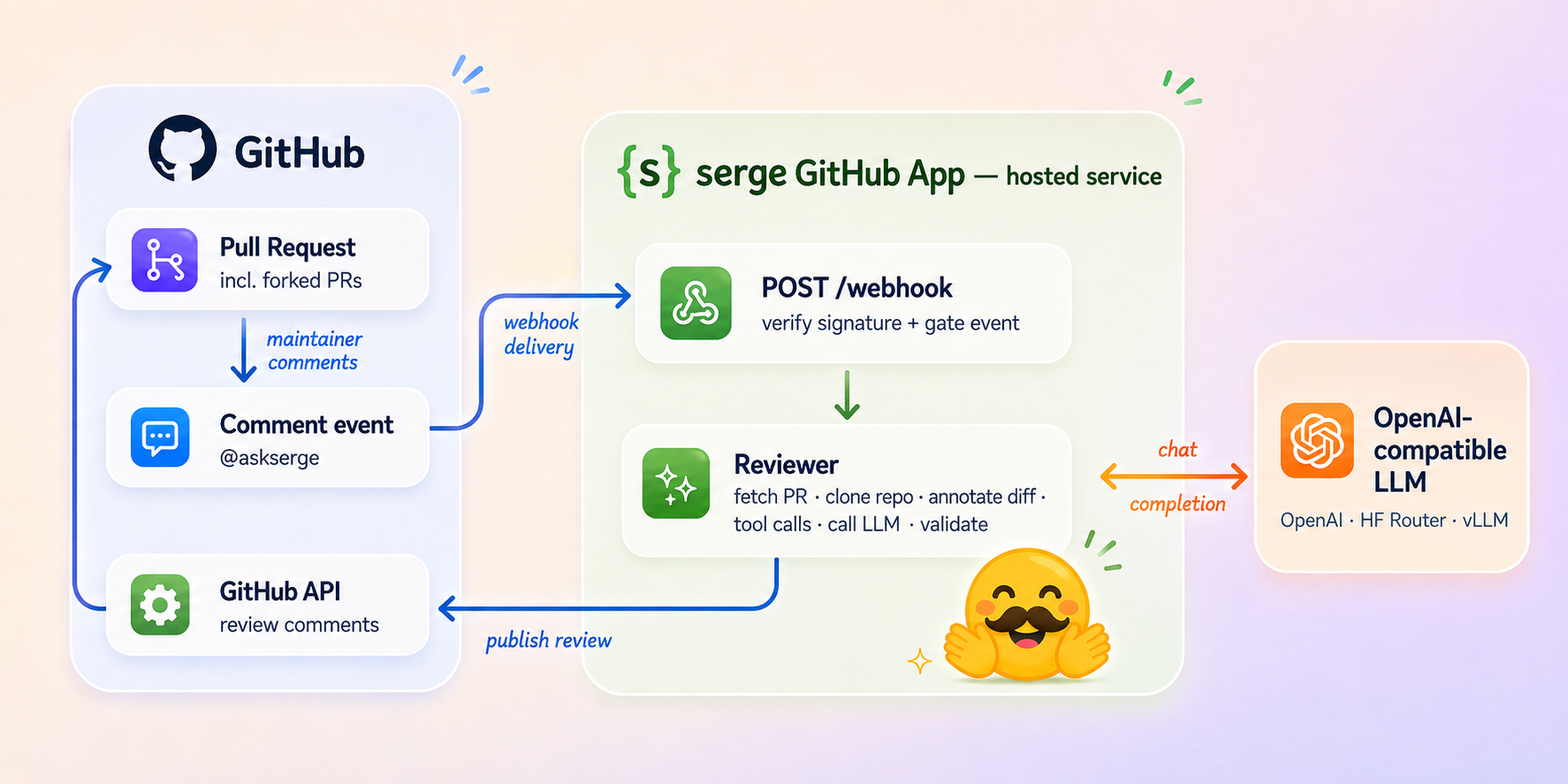
A maintainer mentions @askserge on a PR; GitHub delivers the comment to
POST /webhook; serge verifies the signature, gates the event, fetches and
reviews the PR against an OpenAI-compatible LLM, and publishes the review back
through the GitHub API.
No Per-Repo Workflow Required
This is the whole point of App mode: installed repositories need no workflow
file and no secrets. GitHub delivers comment events straight to the App’s
webhook, so once the App is installed on a repo, @askserge please review just
works. There is nothing to add to .github/workflows/.
Contrast with GitHub Action mode, where every repo carries
its own ai-review.yml and its own LLM_API_KEY secret. In App mode the LLM
credentials live once on the server, and gating (who may trigger, on which PRs)
is enforced centrally in the webhook — see Triggering below.
Add a per-repo workflow only when you want to override the central behavior; see Overriding with a Workflow.
Create the GitHub App
In GitHub, open Settings -> Developer settings -> GitHub Apps -> New GitHub App.
Use these permissions:
| Permission | Access |
|---|---|
| Pull requests | Read and write |
| Contents | Read |
| Issues | Read |
| Metadata | Read |
Subscribe to:
- Issue comment
- Pull request review comment
Set the webhook URL to:
https://<your-host>/webhook
Generate a webhook secret, download the private key, note the App ID, and install the App on the repositories you want reviewed.
Run the Server
git clone https://github.com/huggingface/serge.git
cd serge
python -m venv .venv
source .venv/bin/activate
pip install .
cp .env.example .env
Fill in:
GITHUB_APP_ID=...
GITHUB_PRIVATE_KEY_PATH=./private-key.pem
GITHUB_WEBHOOK_SECRET=...
LLM_API_BASE=https://api.openai.com/v1
LLM_API_KEY=...
Run the webhook app:
reviewbot-app
Production deployments should run reviewbot.app:app behind a WSGI server
such as Gunicorn and expose it over HTTPS.
Triggering
GitHub sends comment events to POST /webhook. A review starts only when:
- the event is
issue_commentorpull_request_review_comment; - the action is
created; - the comment starts with the configured trigger, default
@askserge(first word); - the comment author is not a bot (the App’s own comments are ignored);
- the author association is
MEMBER,OWNER, orCOLLABORATOR; - the PR is open.
Every other event the App receives — pushes, label changes, its own review
comments, installation events, comments from outside contributors — is
filtered out and answered with 204 No Content. Because installed repos have no
workflow to scope events, this webhook gate is the only line of defense, so it
runs the same checks in App mode and Action mode (both call
build_review_request). The bot-author check in particular stops a stray
trigger phrase in the reviewer’s own output from looping forever.
Inline review-comment mentions trigger the follow-up flow instead of a full PR review.
Overriding with a Workflow
The App’s gate (member/owner/collaborator only) is fixed on the server. If a
repo needs different rules — say, only a specific team may trigger reviews, or
reviews should also run on a label — add a per-repo GitHub Action workflow that
enforces the stricter policy and calls huggingface/serge@main itself. Since
the Action posts as the workflow’s GITHUB_TOKEN rather than the App, you can
keep the App uninstalled on that repo (or rely on the repo-level policy to gate
which comments reach a review). See the
GitHub Action guide for the workflow and its if: gate.
Use this only when the central gate is not enough; most repos should stay workflow-free.
Forked PR Limitation
App-mode auto-review works reliably for pull requests opened from a branch of the same repository. Pull requests opened from a fork are not fully supported: the App is not installed on the contributor’s fork, so it cannot read the fork’s head or act with a token scoped to it, and forked PRs are the main vector for prompt-injection from untrusted code. Reviews triggered on forked PRs may fail or be skipped. For fork-heavy repositories, front the App with the web app so a maintainer stays in the loop.
Webhook Concurrency
WEBHOOK_MAX_WORKERS controls how many review workers can run concurrently.
The default is 2.